
Kitchen Design App
Future Plan Co Pty LtdHouse & Home
3.93.00 Reviews
- Version
- 1.2.14
- Installs
- 10.00K
- Age Rating
- Everyone
Screenshots
Our Review of Kitchen Design App
 Analysis by Appyee
When I start planning a kitchen, I want to test ideas before I get attached to a layout that may not suit the room. A phone-based design tool can make that early experimenting less intimidating, especially when I’m trying to explain a look to someone else. Kitchen Design App is aimed at that sort of visual planning: it gives you a place to explore a kitchen concept and share what you have in mind.
What I’d use it for before a renovation
I see this app as most useful at the beginning of a project, when the big questions are still open. Should the cabinets feel light or dark? Does an island make the room feel inviting, or does it crowd the route between the sink and the cooking area? A visual draft can help turn those vague questions into something you can discuss.
For example, imagine measuring a kitchen on a quiet evening and trying to decide whether a new cabinet arrangement is worth pursuing. I’d use the app to sketch out a possible direction, then show the result to the people who use the room every day. Their reactions can reveal practical issues—a blocked walkway or an awkward appliance position—before anyone starts buying materials.
That makes it a better fit for idea testing than for treating a screen image as a construction plan. Even a carefully entered room size cannot account for every real-world complication, such as plumbing, electrical points, uneven walls or installation clearances. I’d take a promising concept to a qualified professional before making costly decisions.
How it fits alongside other planning options
The usual alternatives each solve a different part of kitchen planning. A paper sketch is quick and flexible, but it can be hard for another person to picture. A photo of a finished kitchen is useful for collecting inspiration, but it doesn’t show how that style will work in your own room. A design app sits between those approaches: it can help make a proposal more concrete without replacing a measured site plan or professional advice.
I would not choose this kind of app when the main goal is a precise quote, a technical drawing for a contractor or a verified materials order. In those cases, a specialist design service or a supplier’s planning process is the safer next step. I would also skip it if I only wanted a mood board; saving a few reference images may be faster than building a room concept.
The distinction matters because a convincing visual can create a false sense of certainty. Treat the layout as a conversation starter, not proof that every cabinet will fit or that the finished colors will look identical under your home’s lighting. That modest expectation makes the app more useful, not less: it can help narrow choices before the detailed work begins.
A practical way to compare competing ideas
One useful workflow is to keep the room itself constant while testing one decision at a time. I’d first settle on a rough layout, then compare cabinet colors or countertop finishes without changing everything at once. If I altered the layout, lighting and materials together, I might like the overall picture without knowing which choice made it work.
I’d also save a simple “safe” version before trying a more adventurous direction. A familiar layout gives you a reference point when an experiment starts to look attractive but proves awkward to use. For a shared project, that baseline can keep feedback focused: people can compare a specific change instead of debating two completely different rooms.
Before sharing a design, I’d check that the room dimensions and the most important fixed features are represented as accurately as possible. A small measuring mistake can distort the apparent space and make a narrow passage look generous. This is a useful discipline even when the goal is only to discuss style, because it keeps visual enthusiasm from hiding an obvious fit problem.
Who is likely to get the most from it?
I’d recommend trying it if you enjoy visual decision-making, are preparing for a kitchen refresh, or need a clearer way to discuss possibilities with a partner or family member. It can also help someone who feels overwhelmed by choices: comparing a few coherent directions is easier than trying to imagine every finish from a sample alone.
It is less suited to someone who expects an automatic renovation plan or exact purchasing guidance. A homeowner with a complicated room, unusual angles or major structural work should start with measurements and professional input rather than relying on a mobile visualization. Likewise, if you already know the layout and finishes you want, building a digital version may add effort without changing your decision.
I’d keep an eye on the purchase model before settling into a long project. The app is free to download, while in-app purchases are listed from $9.99 to $299.99 per item. That range makes it sensible to check what a paid item offers before committing, especially if you only need a quick concept rather than an extended design session.
Getting Started with Your Dream Kitchen
Kitchen Design App is a free House & Home app from Future Plan Co Pty Ltd. It has an average rating of 3.9 from around 270 ratings and has been installed over 10,000 times. It is rated for everyone, so it is suitable for a broad audience. The app was released in September 2024, and its current version is 1.1.4. Those details place it as a relatively focused tool for people who want to explore kitchen ideas rather than a general home-planning suite.
First things first, downloading the Kitchen Design App is a breeze. It's available on both Android and iOS, so no one misses out. After a quick installation, you're greeted with a user-friendly interface that’s both intuitive and visually appealing. It’s almost like the app is inviting you to start designing right away!
Once you launch the app, you'll find a handy tutorial that guides you through the basics. It’s perfect for folks who might not be too tech-savvy. If you’re like me and prefer to dive right in, you can skip the tutorial and start exploring. The app is designed to accommodate both approaches, which is a nice touch.
Features That Make Designing Fun
One of the standout features of this app is its drag-and-drop functionality. You can easily move cabinets, appliances, and even wall sections around with just a swipe of your finger. This feature is not only user-friendly but also makes the entire design process feel like a breeze.
Another cool aspect is the extensive library of kitchen elements. You’ve got everything from rustic farmhouse sinks to ultra-modern induction cooktops. Plus, the app regularly updates its catalog with the latest trends and styles, so your designs are always fresh.
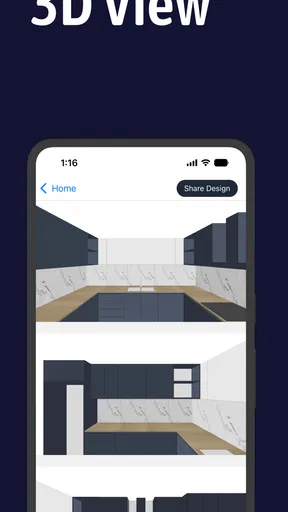
The app also boasts a realistic 3D view that lets you visualize your kitchen from every angle. It’s almost like standing in your future kitchen, minus the construction noise! This feature is especially helpful for visualizing how different elements come together in the actual space.
Customization at Its Best
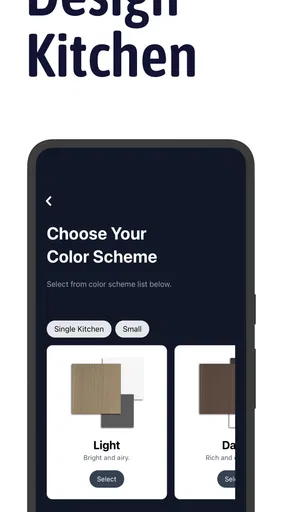
What I love most about the app is the level of customization it offers. You can tweak colors, materials, and even lighting to match your vision. Want a marble countertop with a matte black finish on your cabinets? No problem. The app allows for endless combinations, ensuring that your design is uniquely yours.
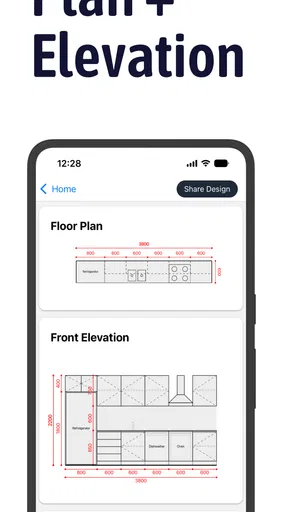
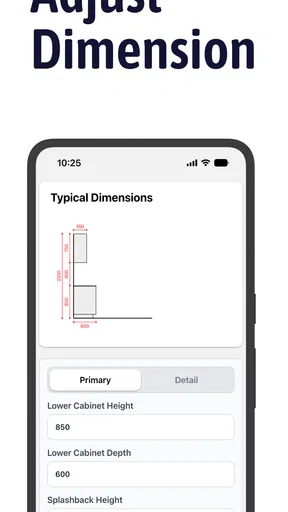
Additionally, the app has a nifty measurement tool. You can input the actual dimensions of your kitchen space, ensuring that everything fits perfectly. This feature is a lifesaver, especially for those of us who aren't exactly spatial geniuses!
Even with a measurement tool, I’d treat the result as a planning aid rather than a guarantee of installation fit. For a better starting point, measure the room in more than one place if the walls may not be square, and note fixed openings and features before arranging cabinets. A digital layout is only as dependable as the dimensions entered, so careful measuring is worth the extra few minutes.
Collaboration and Sharing
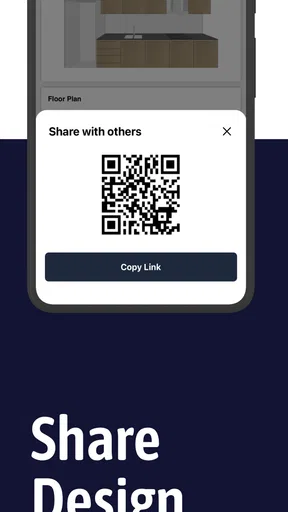
If you’re working with a designer or just want to show off your ideas, the app makes sharing super easy. You can export your designs as high-quality images or even share them directly via email or social media platforms. It’s a fantastic way to get feedback or simply boast about your design prowess!
The app also includes a collaboration feature. You can invite others to view and edit the design in real-time. This is particularly useful for couples or families who want to co-design their dream kitchen without having to be in the same room.
For a productive review session, I’d ask each person to comment on a particular use of the room rather than simply vote for a favorite look. One person can consider food preparation, another storage, and another how the kitchen connects to the rest of the home. That approach turns a shared design into a practical discussion and makes disagreements easier to resolve.
Speed, stability, and device expectations
A kitchen design app can feel responsive during simple edits and become more demanding when a project includes a detailed room, many objects or a 3D view. I would expect the smoothest experience on a device that handles visual apps comfortably, but I would not judge a phone’s performance from a single complex scene. If moving around a design feels sluggish, simplifying the draft before adding more detail is a sensible first step.
For a longer session, I’d work in stages: establish the room, arrange the main units, and only then spend time refining finishes and lighting. That order helps keep the task manageable and gives you a useful concept sooner. It also means that if you need to pause, you have already settled the decisions that matter most rather than spending the whole session polishing a look.
When sharing or editing together, I’d make sure everyone is discussing the same version of the idea and check the result after a round of changes. Real-time collaboration is convenient, but multiple people making different adjustments at once can make it harder to track why a layout changed. A short pause to review the room together is often more useful than adding edits continuously.
When a different tool is the better choice
If you need to coordinate a full renovation, including trades, schedules and exact product specifications, a kitchen visualization app is only one small part of the process. I’d use it to communicate preferences, then rely on the appropriate supplier, designer or contractor for technical decisions. That division of labor keeps the visual planning enjoyable without asking it to do work it was not designed to replace.
It may also be the wrong choice if you dislike designing on a phone or tablet. Some people find it easier to compare layouts on paper or on a larger screen, where room proportions and small details are easier to inspect at once. I’d choose whichever format lets me notice practical problems, rather than assuming a digital model is automatically clearer.
Wrapping It Up
In a nutshell, Kitchen Design App is a delightful blend of creativity and functionality. It empowers users to bring their kitchen designs to life with ease and precision. Whether you're a seasoned designer or someone just looking to renovate your kitchen, this app has something for everyone.
My more cautious take is that it is strongest when used to explore possibilities and communicate a direction, not when treated as a substitute for professional measurements or renovation planning. Its visual tools and sharing options make it appealing for early decisions, while the free entry point makes it easy to see whether the workflow suits you. The in-app purchase range is worth bearing in mind if you decide to use it beyond a first experiment.
So, if you’re ready to unleash your inner designer and transform your kitchen dreams into reality, give the app a try. I promise, you won’t be disappointed!
Verdict
Strengths of Kitchen Design App
- User-friendly interface for beginners.
- Extensive library of design templates.
- Real-time 3D visualization feature.
- Customizable color and material options.
- Easy sharing of designs with others.
Limitations of Kitchen Design App
- Limited free version features.
- Occasional app crashes reported.
- Requires internet for full functionality.
- Some features are behind a paywall.
- Lacks integration with other design apps.
Similar Picks in This Category
View All
Universal TV Remote Control
CodeMatics Media Solutions3.9

AlfredCamera Home Security app
Alfred Systems Inc.4.7

Planner 5D: AI Home Design
Planner 5D4.5

Universal Tv Remote-Cast to TV
One Music Player4.1

Zillow: Homes for Sale & Rent
Zillow Group4.8

99acres Buy/Rent/Sell Property
infoedge.com4.3
Frequently Asked Questions
What features does the Kitchen Design App offer?
The Kitchen Design App provides a wide range of features, including customizable layouts, 3D visualization, and a vast library of kitchen elements such as cabinets, appliances, and fixtures. Users can also access a color palette and material options to create a personalized kitchen design. Additionally, the app supports augmented reality to visualize designs in real space.
Is the Kitchen Design App user-friendly for beginners?
Yes, the Kitchen Design App is designed with an intuitive interface that caters to both beginners and professionals. It includes step-by-step tutorials and a help section to guide new users through the design process. The drag-and-drop feature makes it easy to adjust layouts and elements without any prior design experience.
Does the Kitchen Design App require an internet connection?
While some features of the Kitchen Design App, such as downloading new design templates and accessing the latest updates, require an internet connection, the core functionalities like layout creation and 3D visualization can be used offline. This makes it convenient for users to work on designs anywhere, anytime.
Can I share my kitchen designs with others using the app?
Yes, the Kitchen Design App allows you to share your designs easily. You can export your projects in various formats, such as images or PDFs, and share them via email or social media platforms. The app also supports collaboration by allowing multiple users to work on a project simultaneously, which is great for design teams.
Is the Kitchen Design App available for both Android and iOS devices?
The Kitchen Design App is available on both Android and iOS platforms, ensuring a seamless experience across devices. It is optimized for smartphones and tablets, providing flexibility in how you choose to work on your designs. Regular updates ensure compatibility with the latest operating systems.
